


The biggest challenge for any employee survey is to create meaningful change. This was true in the early days of annual satisfaction surveys and is still the case with modern employee experience, lifecycle, and employee pulse surveys.
Why is driving change post-survey such a stubborn challenge?
Because while some programmatic changes are driven centrally, some changes must also be implemented locally. This means hundreds or even thousands of managers and mid-level leaders need to be equipped with data and insights to support the change process. Too often, unfortunately, all they get is a PowerPoint deck. Even for those that get an “interactive” report, it is typically limited in its ability to dissect, rearrange, segment, and compare results on-the-fly, without having to go back to HR to reconfigure and rerun the report. By that time, most managers have lost interest, and let’s face it, they don’t have the bandwidth either.
The fact is that most survey reports, static or interactive, simply do not allow the user to get to the data of greatest interest and relevance in the moment of exploration. This is a great failing when you consider how advances in technology have transformed the rest of the survey process. While we use modern technology to collect and analyze data, when it comes to helping managers derive insights that provoke change, we’re still acting like it’s 1998.
But it doesn’t have to be this way.
Why empower your managers and leaders with direct access to employee survey results?
WTW’s Engage platform democratizes direct access to survey results through its Smart Reports. First, Smart Reports immediately suggests three areas for the manager or leader to prioritize including advice on how to address each area. Further, all users can switch comparison groups, create new groups, and examine the impact of multiple breakdowns simultaneously while strictly preserving employee confidentiality.
Three examples illustrate the power of this approach.
Example 1: Letting managers to dive deeper into employee survey data by geography or function
Let’s imagine a department of 35 people, 10 of whom were added to the group in a recent restructuring. These newer colleagues are based in Mexico, and the rest are based in the U.S. A static report might compare the combined group to the U.S. national norm because that’s where most of the group is, and the HR colleagues who helped configure the reports aren’t familiar with the composition of a group this small.
Using Smart Reports, the manager of this department can directly access the results and, working independently, easily split the group into two comparing each to its relevant external benchmark. As shown below, important differences emerge for Mexico-based employees.
You can easily imagine analogous situations where the group of 10 employees comes from a related but distinct function, like marketing and sales, or manufacturing and distribution.
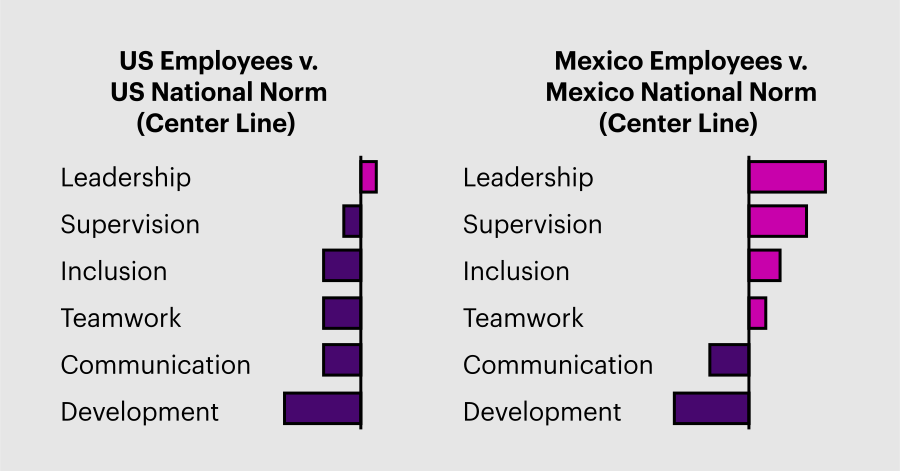
Detailed comparison of US national norms versus Mexico national norms
Example 2: Empowering managers to explore employee survey data to better understand exit survey feedback
Now, let’s envision a division with 300 employees working across four locations and three shifts. In this scenario, the leader is reviewing the survey’s open-ended comments, made in response to the question, “What one thing would you do to improve this company as a place to work?” The leader is surprised to see that Supervision does not emerge as a substantial theme, given recent exit survey data. A static report might show the comments for the whole group, or perhaps segmented by location, but with no opportunity to explore comments for custom subgroups.
Using Smart Reports in Engage, the leader of this division can easily create a new group of employees from the overnight shift in 3 of the 4 locations, consistent with recent turnover patterns, and examine the comments for this newly defined group. As shown below, the issue with Supervision is now readily apparent.
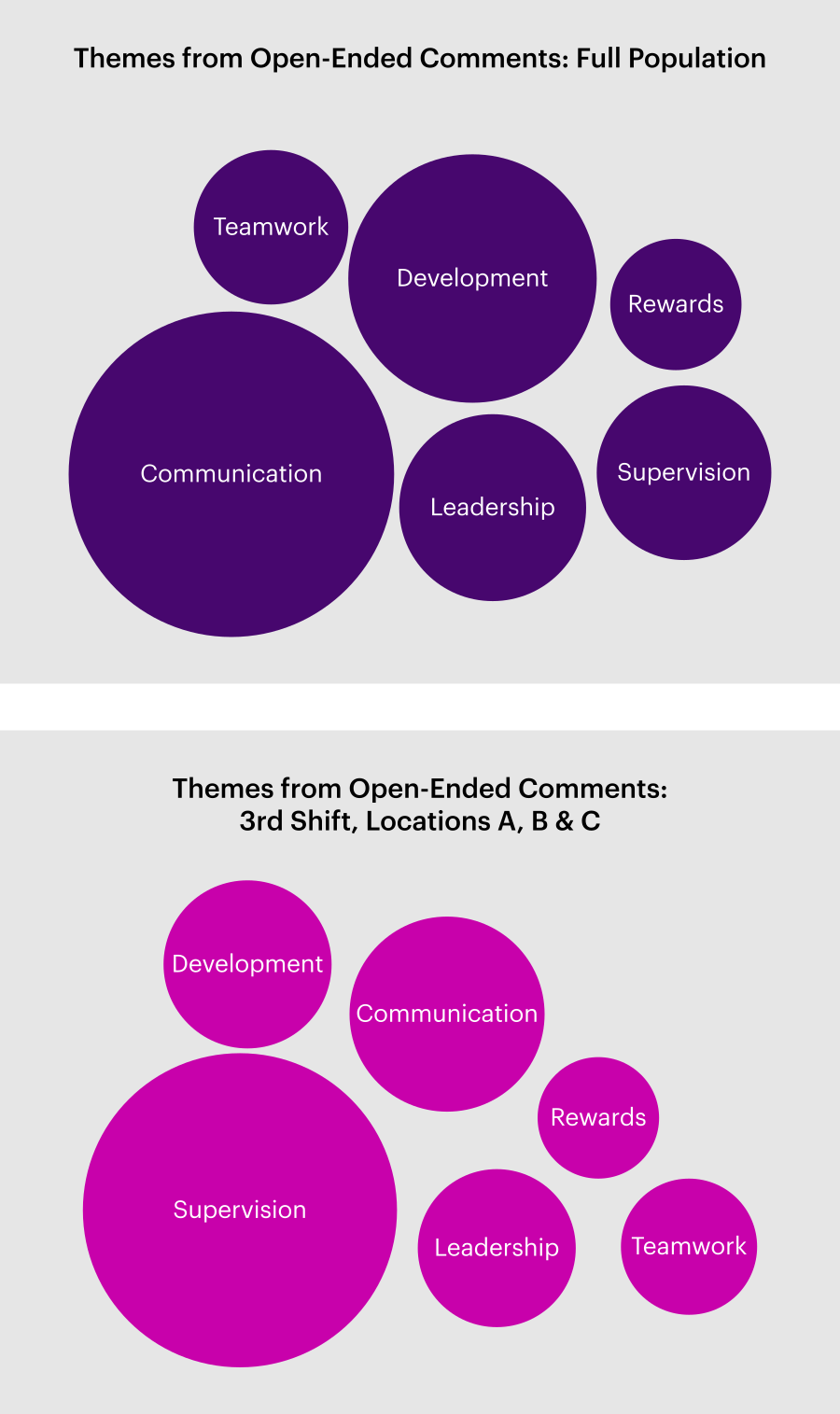
Reviewing a survey’s open-ended comments by custom subgroups reveals more insightful data
Example 3: Allowing managers and leaders to explore employee survey data across multiple factors like gender and years of experience to reveal powerful insights
In our final example, let’s imagine a business unit with 700 employees. This group is large enough to warrant a review of demographic breakdowns to isolate any critical differences across subgroups. A static report might show standard breakdowns by, for example, gender and length of service, which may not reveal any noteworthy patterns.
Using Smart Reports in Engage, however, the leader can readily combine any breakdown groups to examine the impact of multiple factors at once, which in this case reveals the unique lack of inclusion experienced by women starting their careers, as shown below.
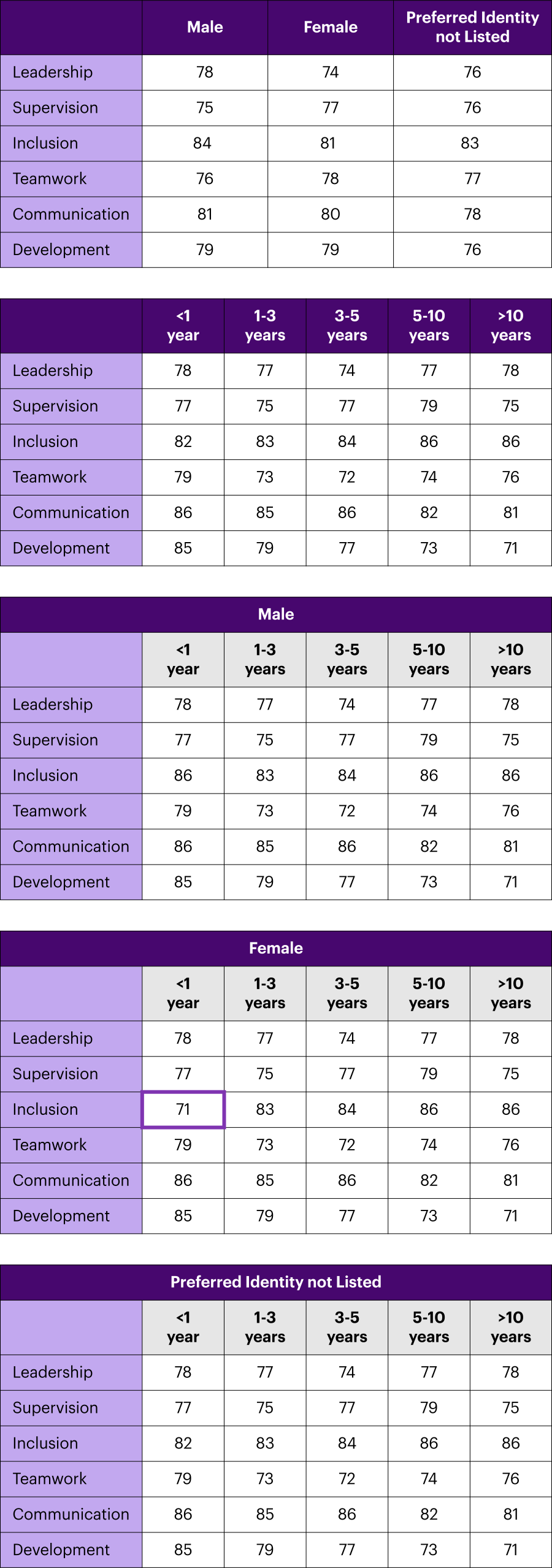
With WTW’s Smart Reports in Engage, you can combine any breakdown groups to examine the impact of multiple factors at once
It’s not 1998 anymore. Distributing employee survey results to managers and leaders via static PowerPoint decks makes about as much sense as faxing them. Instead, take a more modern approach by giving direct access to the results and the ability to interrogate the data. By doing this, you can empower your colleagues with the insight they need to create meaningful change.
Contact your WTW consultant or success manager to get access to Engage Smart Reports or request a demo.
Author